Introduction
A via may look like a simple hole in a PCB, but its drill diameter, pad diameter, annular ring, board thickness, plating, and layer transition all affect whether it is electrically reliable and manufacturable.
Vias are one of the most important building blocks of a multilayer PCB. They provide electrical connections between different copper layers, allowing signals, power, and ground to move through the board without requiring long traces on a single layer. Although a via is physically small, its drill diameter, pad size, annular ring, aspect ratio, plating, spacing, and placement can significantly affect PCB manufacturability and electrical performance.
Choosing a PCB via is therefore not simply a matter of using the smallest possible hole. A via that is too small may exceed the PCB manufacturer’s drilling or plating capabilities, while an unnecessarily large via consumes valuable routing space and can create problems in dense layouts. For high-current designs, the via must also provide sufficient copper cross-section, while high-speed and RF designs require careful consideration of via inductance, parasitic capacitance, signal discontinuity, and return-current paths.
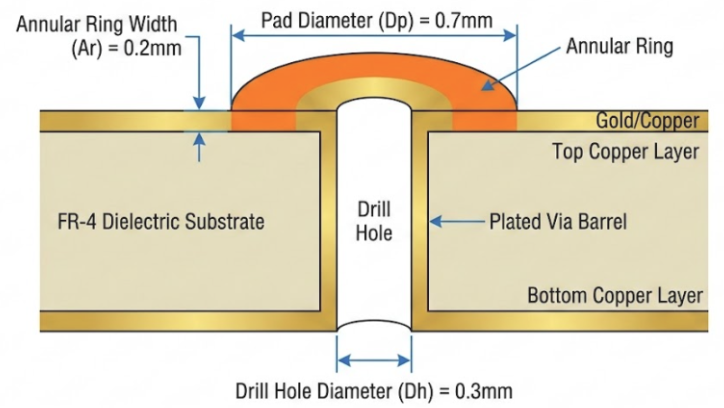
This PCB Via Design Guide explains how to select and calculate via dimensions and how different via structures should be used in practical PCB layouts. It covers standard through-hole vias, blind and buried vias, micro vias, via-in-pad structures, thermal vias, power vias, and high-speed signal vias, along with spacing, aspect ratio, manufacturing, and layout considerations.
What Is a Via in PCB Design?
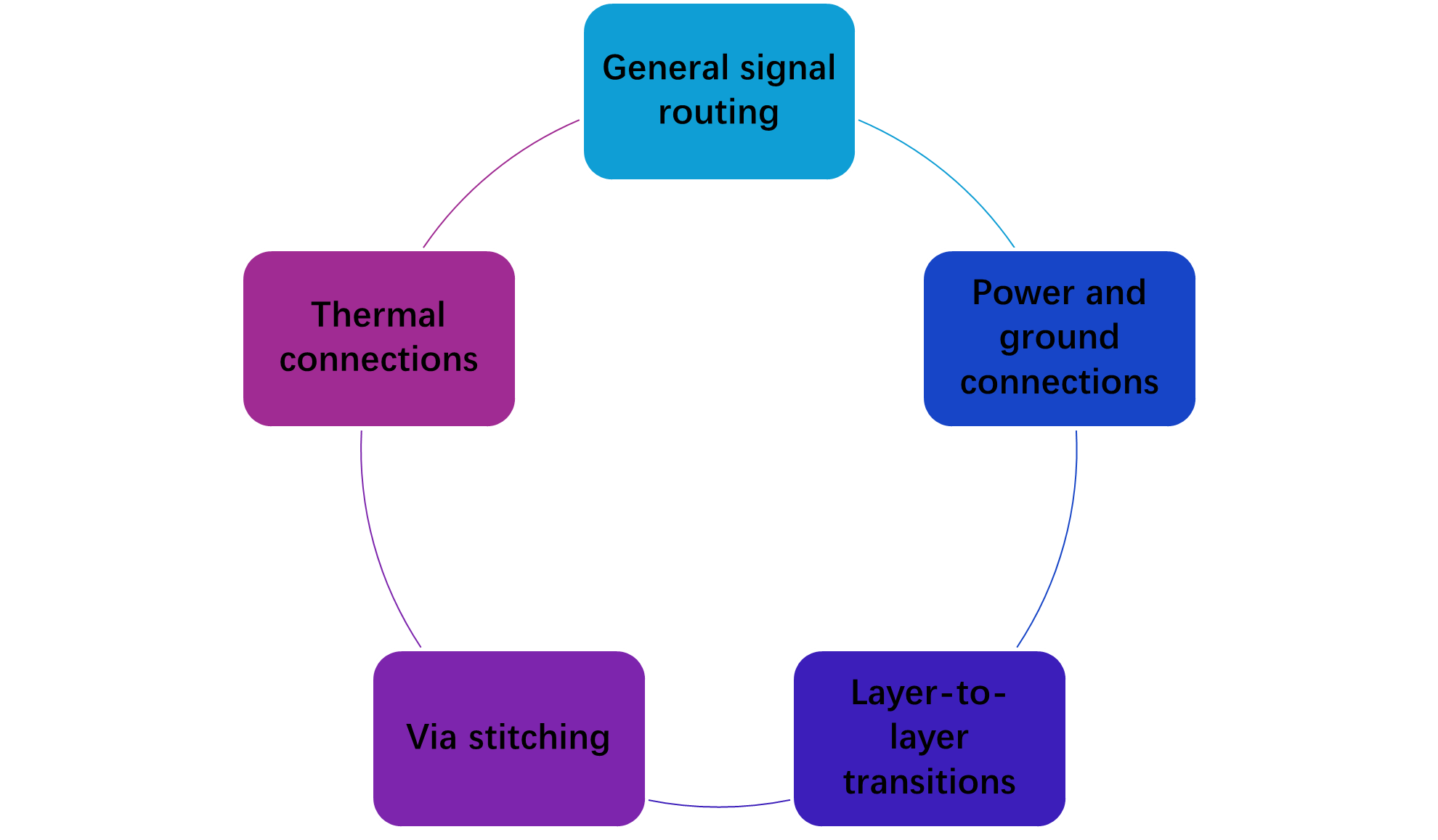
A via is a plated hole in a printed circuit board (PCB) that creates an electrical connection between two or more copper layers. In a multilayer PCB, vias allow a trace routed on one layer to transition to another layer without requiring an external wire or jumper. This makes them essential for signal routing, power distribution, ground connections, and multilayer PCB design.
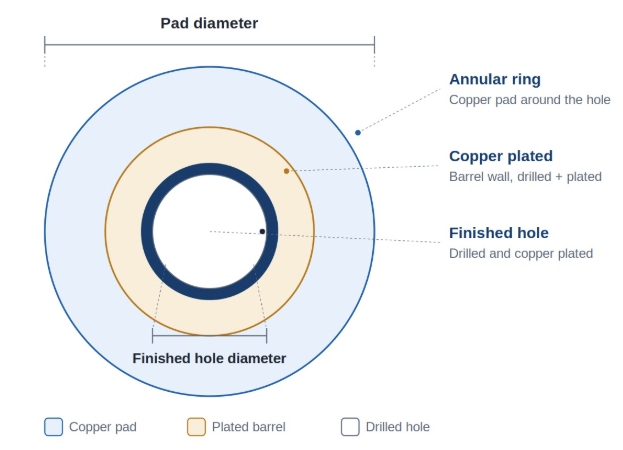
A conventional through-hole via consists of a drilled hole surrounded by a copper pad and plated with copper along the inside wall. The copper plating forms a conductive barrel that connects the copper layers through which the via passes. The circular copper area around the hole is called the annular ring, and it provides the connection between the via barrel and the PCB trace or copper plane.
How Does a PCB Via Work?
Consider a four-layer PCB where a signal trace needs to move from the top layer to an inner signal layer. Instead of routing the trace around other components, the designer places a via at the transition point.
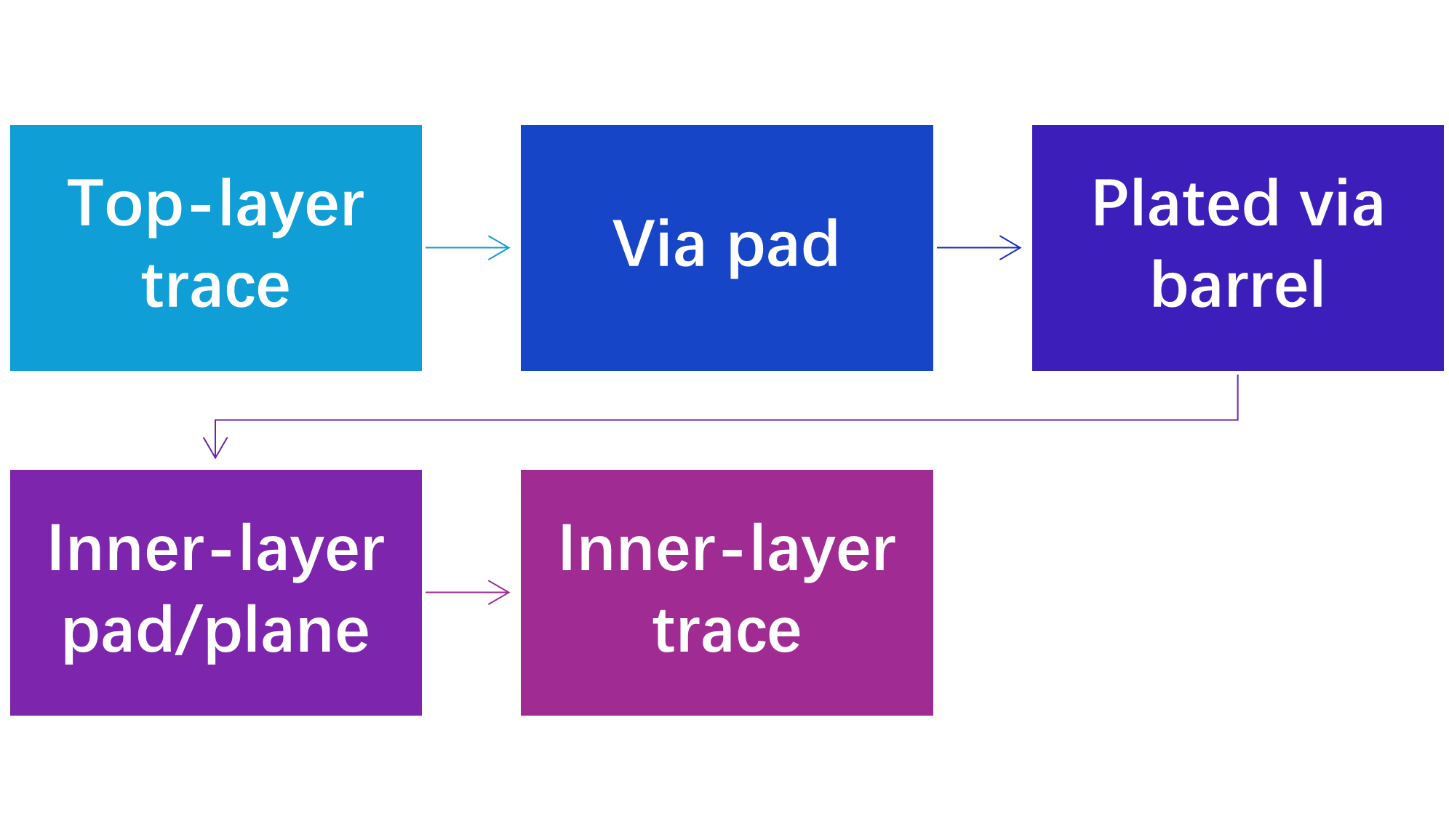
The same principle applies to power and ground connections. For example, a ground via can connect a component’s ground pad on the top layer directly to an internal or bottom-layer ground plane.
Main Parts of a PCB Via
The via contains several important physical features, which are included in the table below.
Table. Key structural terms used when describing PCB vias.
Types of PCB Vias
PCB vias are available in several structures, and each type is designed for a different routing, manufacturing, or electrical requirement. The correct choice depends on the PCB layer count, available routing space, board thickness, component pitch, signal speed, and manufacturing process.
Through-Hole Via
A through-hole via extends through the entire PCB, connecting the outer layers and any internal copper layers along its path. It is the most common and generally the most economical via structure because it can be manufactured using conventional mechanical drilling.
They are particularly practical for standard 2-layer and 4-layer PCBs, where routing density does not require more advanced via structures.
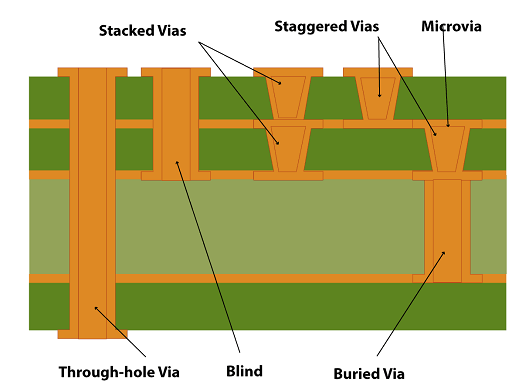
The main disadvantage is that the drilled barrel occupies space on every layer it passes through. This can restrict routing on dense multilayer boards.
Blind Via
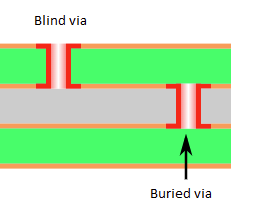
A blind via connects an outer PCB layer to one or more internal layers without passing through the entire board. Because the via does not extend through the complete PCB, it can free up routing space on the unused layers.

However, blind vias generally require more advanced manufacturing processes and can increase PCB fabrication cost.
Buried Via
A buried via connects two or more internal PCB layers but does not reach either outer surface. Since it is completely enclosed within the PCB, it can provide additional routing flexibility without consuming space on the external layers.
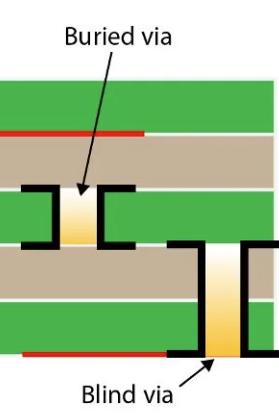
However, the manufacturing process is more complex than that of a conventional through-hole via because the internal connection must be fabricated before the complete PCB stack-up is assembled.
Microvia
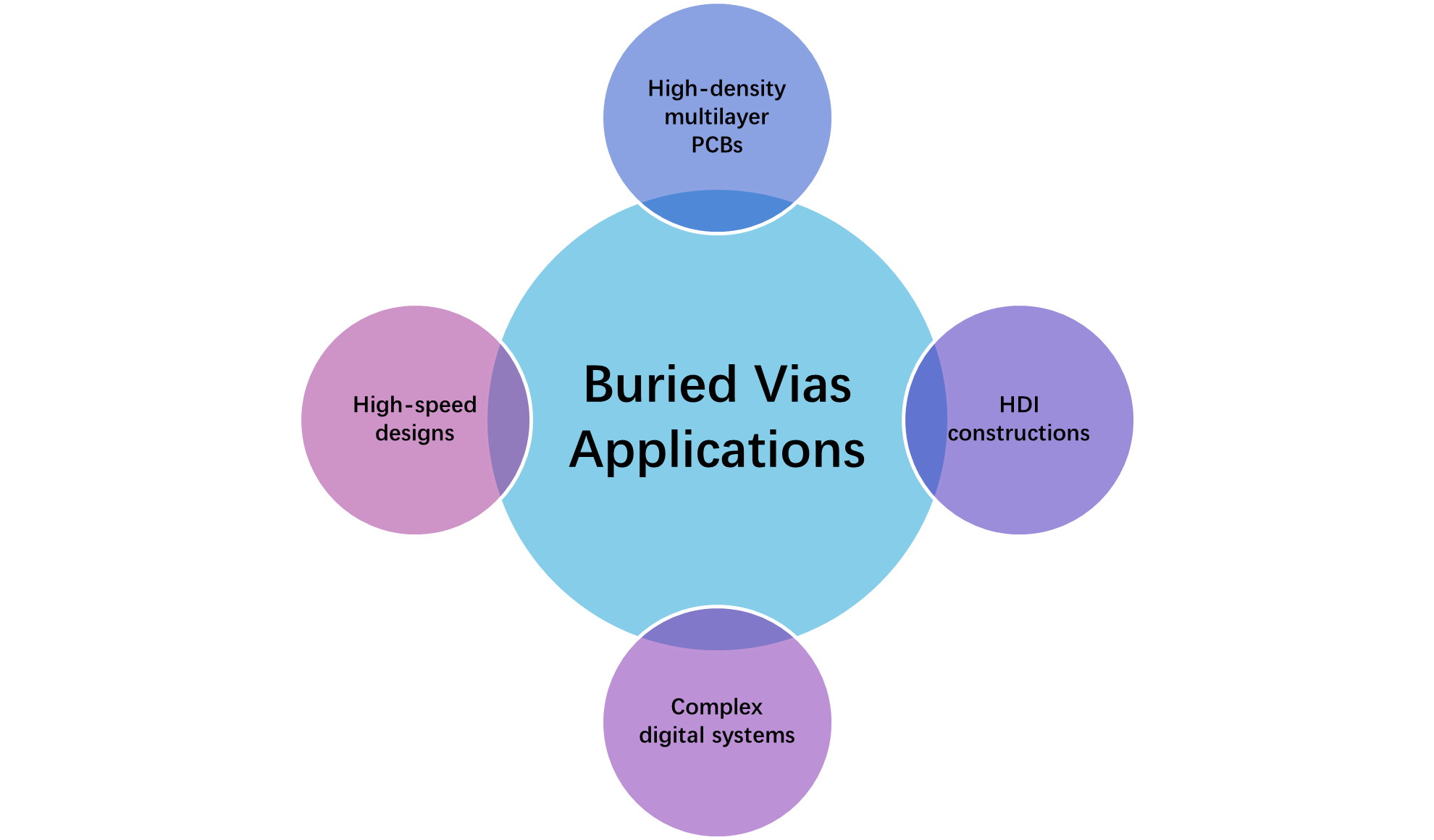
A microvia is a very small via typically produced using laser drilling rather than conventional mechanical drilling. Microvias are widely associated with HDI (High-Density Interconnect) PCBs, where conventional vias would consume too much routing space.
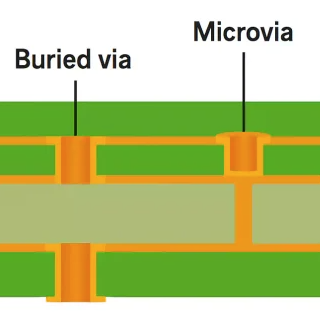
Because of their small dimensions and manufacturing requirements, microvia structures should be designed according to the PCB manufacturer’s specific fabrication capabilities.

Via-in-Pad
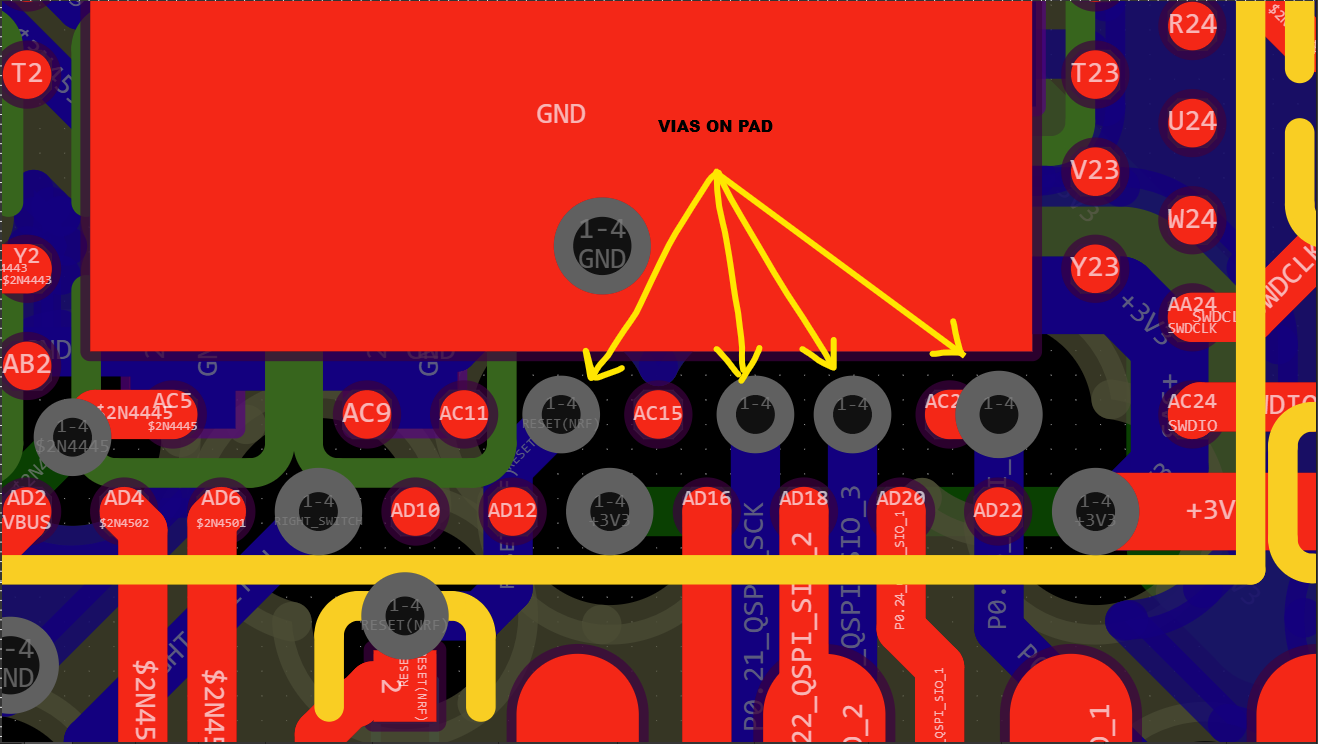
A via-in-pad places the via directly inside a component’s copper pad rather than beside the pad. This technique is particularly useful when routing signals from fine-pitch BGA and other compact packages where conventional fanout routing is difficult.
Via-in-pad can significantly reduce routing distance and improve PCB density, but the vias generally require appropriate manufacturing treatment, such as via filling and planarisation, to prevent solder from flowing into the via during assembly.
Thermal Via
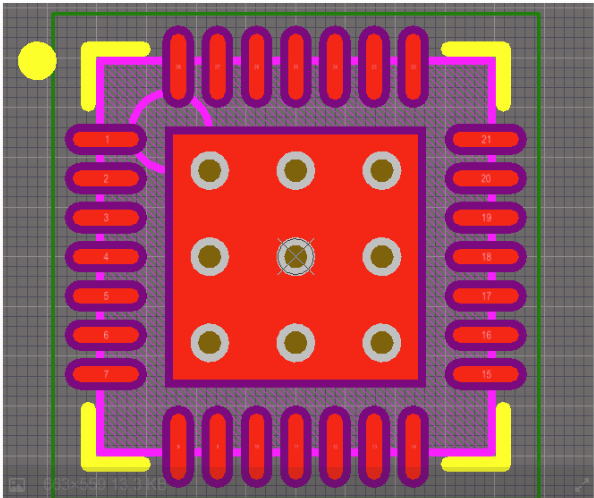
A thermal via is primarily used to transfer heat from a component or exposed thermal pad into a larger copper area or internal ground plane. These vias are commonly placed underneath.
A group of thermal vias creates a low-thermal-resistance path from the component into the PCB copper. The number, diameter, spacing, and construction of thermal vias should be selected according to the component manufacturer’s recommendations and PCB fabrication capabilities.
PCB Via Size: Drill Diameter vs Pad Diameter
Via size is one of the most important parameters in PCB layout because it determines how much board space a via consumes and whether it can be reliably manufactured. When specifying a via, designers often refer only to the drill diameter, but a complete via definition also includes the finished hole, pad diameter, and annular ring. These dimensions must be considered together when creating PCB design rules. This section of the blog covers a comprehensive guide to drill diameter and pad diameter.
Drill Diameter
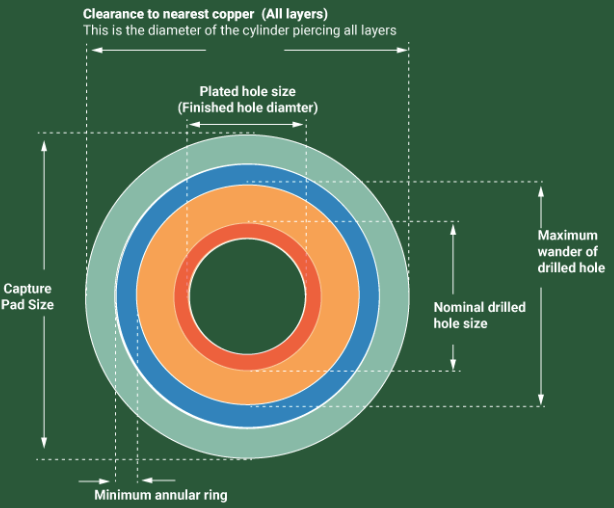
The drill diameter is the diameter of the hole created during the PCB drilling process. Depending on the PCB manufacturer’s terminology, the specified drill value may represent the tool diameter or the required finished hole diameter after plating. Therefore, always check the manufacturer’s fabrication specifications before defining the drill size in your PCB CAD tool.
Finished Hole Size
The finished hole is the actual usable opening after the PCB has been plated and manufactured. For applications requiring mechanical insertion, such as connector pins, the finished hole dimension is particularly important.
Via Pad Diameter
The via pad is the copper area surrounding the drilled hole. Increasing the pad diameter provides a larger copper landing area and generally improves manufacturing tolerance, but it also consumes more routing space.
For example, a via with a 0.30 mm finished hole and 0.60 mm pad has a nominal total copper width of:
0.60 mm − 0.30 mm = 0.30 mm
Annular Ring
The annular ring is the radial distance between the edge of the hole and the edge of the surrounding copper pad.
It can be calculated as:
Annular Ring Calculation
Annular Ring = (Pad Diameter − Hole Diameter) ÷ 2
Pad Diameter: 0.60 mm
Hole Diameter: 0.30 mm
Therefore:
Annular Ring = (0.60 − 0.30) ÷ 2
= 0.15 mm
How to Calculate PCB Via Size
Selecting a PCB via size requires more than choosing a drill diameter. A reliable via must provide enough copper around the hole, adequate manufacturing margin, and sufficient electrical capacity for the intended application. The three primary dimensions to consider are the hole diameter, pad diameter, and annular ring.
Calculate the Annular Ring
The basic relationship between the via pad, hole, and annular ring is:
Annular Ring = (Pad Diameter − Hole Diameter) ÷ 2
For example, consider a via with a 0.30 mm hole and a 0.60 mm pad:
Annular Ring = (0.60 − 0.30) ÷ 2
= 0.15 mm
This means the via has 0.15 mm of copper surrounding the hole on each side.
Drill Diameter vs Finished Hole
One of the most common sources of confusion in PCB via design is the difference between the drill/tool diameter and the finished hole diameter.
During fabrication, the drilling tool creates the hole and the hole wall is subsequently plated with copper. Therefore, the final hole can be smaller than the original mechanical drill diameter.
For example, if a manufacturer specifies a particular drill size as a tool diameter, you should not automatically assume that this is the final finished hole.
Choosing the Via Pad Diameter
Once the required hole size is established, select a pad diameter that provides sufficient annular-ring margin.
A simple starting relationship is:
Pad Diameter = Hole Diameter + 2 × Required Annular Ring
For example, if you need a 0.20 mm hole and want a nominal 0.15 mm annular ring:
Pad Diameter = 0.20 + (2 × 0.15)
= 0.50 mm
Therefore, a 0.20 mm hole with a 0.50 mm pad provides a nominal 0.15 mm annular ring.
What Is PCB Via Aspect Ratio?
PCB via aspect ratio describes the relationship between the depth of a via and its drilled hole diameter. It is an important PCB manufacturing parameter because a long, narrow via is more difficult to drill, plate, and manufacture reliably than a short, wider via.
For a conventional through-hole via, the basic calculation is:
Via Aspect Ratio = PCB Thickness ÷ Drill Diameter
For example, consider a standard 1.6 mm thick PCB with a 0.20 mm drilled hole:
Aspect Ratio = 1.6 ÷ 0.20
= 8:1
Why Does Via Aspect Ratio Matter?
The main reason aspect ratio matters is copper plating. During PCB manufacturing, copper must be deposited onto the inside wall of the drilled hole. As the hole becomes deeper and narrower, achieving consistent plating throughout the barrel becomes more difficult.
What Aspect Ratio Should You Use?
There is no single universal maximum aspect ratio for every PCB manufacturer or application. Fabrication capability varies, and the acceptable ratio depends on the drilling and plating process, PCB construction, reliability requirements, and manufacturer qualification.
As a practical design approach, 8:1 is a comfortable target for many conventional mechanically drilled vias, while higher ratios such as 10:1 or above should be confirmed with the fabricator before release.
Via Aspect Ratio Examples
| PCB Thickness | Drill | Aspect Ratio |
|---|---|---|
| 1.0 mm | 0.20 mm | 5:1 |
| 1.6 mm | 0.20 mm | 8:1 |
| 2.0 mm | 0.25 mm | 8:1 |
| 2.4 mm | 0.30 mm | 8:1 |
| 3.2 mm | 0.40 mm | 8:1 |
The typical aspect ratios for all vias type are;
Recommended Via Sizes for Common PCB Designs
There is no single standard PCB via size that is appropriate for every design. The best via depends on the PCB thickness, routing density, current requirement, component pitch, fabrication process, and the capabilities of the selected PCB manufacturer.
For conventional multilayer boards, a 0.20–0.30 mm finished hole is a useful starting range for signal vias. A commonly used combination is a 0.20 mm hole with a 0.40 mm pad, while a 0.30 mm hole with a 0.60 mm pad provides more manufacturing and annular-ring margin. TI, for example, documents a 0.20 mm drill with a 0.40 mm pad as a standard via in one of its PCB layout recommendations.
Most PCB manufacturers currently like 0.20 mm as a preferred minimum via-hole size and recommends a via diameter at least 0.10 mm larger than the via hole. It also lists 0.20 mm hole-to-hole spacing as a capability.
Via Design for High-Speed Signals
Vias become much more important when designing high-speed digital, RF, and high-frequency interfaces. At low frequencies, a via can often be treated as a simple electrical connection. As signal edge rates increase, however, the via becomes part of the transmission path and can introduce impedance discontinuities, parasitic capacitance, inductance, reflections, crosstalk, and signal loss.
Minimize Vias on High-Speed Signals
The simplest way to reduce via-related signal-integrity problems is to avoid unnecessary layer transitions. Every signal via changes the physical geometry of the transmission line and can introduce a small impedance discontinuity.

For critical interfaces such as USB, PCIe, Ethernet, DDR, MIPI, LVDS, and high-speed SerDes, keep the number of vias as low as practical and use a consistent routing structure.
Minimize Via Stubs
One of the most important considerations in high-speed via design is the via stub. A stub is the unused portion of a through-hole via that extends beyond the layer where the signal exits. Although this section of the barrel is not part of the intended signal path, the high-frequency signal still interacts with it.
Keep Differential-Pair Vias Symmetrical
For differential signals, both traces should experience as nearly identical an electrical environment as possible. When a differential pair changes layers, keep Signal-via dimensions matched, Signal-via spacing consistent, Ground-via placement symmetrical, and Routing lengths matched.
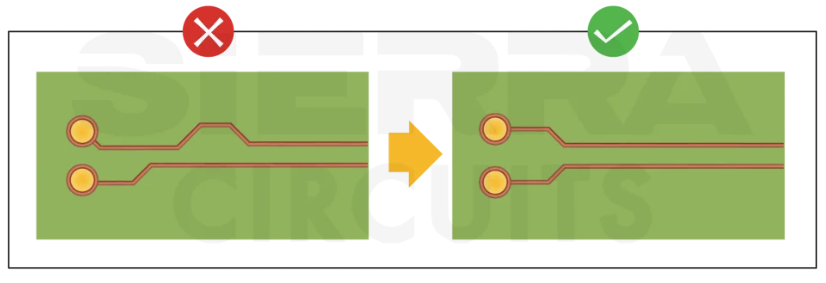
Via-in-Pad Design
Via-in-pad (VIP) is a PCB layout technique in which a via is placed directly inside the copper pad of a surface-mount component. Instead of routing a short trace from the component pad to a nearby via, the signal or power connection transitions directly through the pad to another PCB layer. This approach saves routing space and is especially useful for fine-pitch BGAs, QFNs, CSPs, and high-density PCB designs.
Via-in-Pad for BGA Packages
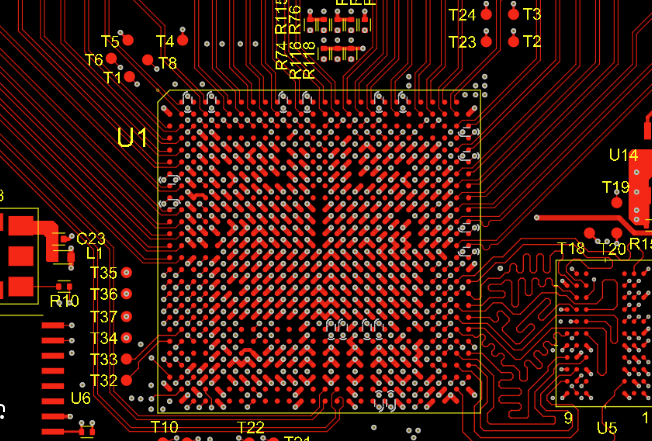
Via-in-pad is particularly useful when routing fine-pitch BGA packages. With conventional dog-bone fanout, a via is placed beside the BGA pad and connected using a short trace. As the BGA pitch decreases, there may no longer be enough space for this arrangement.
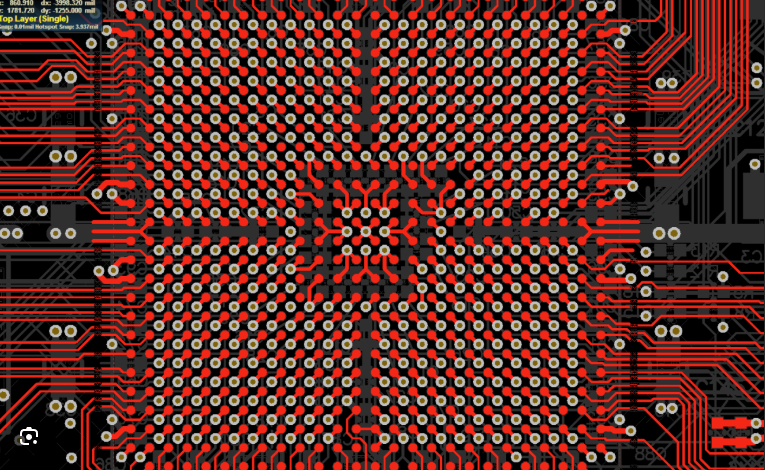
In such cases, placing a microvia directly in the BGA pad allows the connection to transition to an inner layer without consuming the limited space between neighboring pads.
Via-in-Pad for QFN Thermal Pads
Via-in-pad techniques can also be used with the exposed thermal pad of QFN and other bottom-terminated packages. Vias underneath the thermal pad can provide a direct path into the PCB’s internal copper planes, helping transfer heat away from the package.
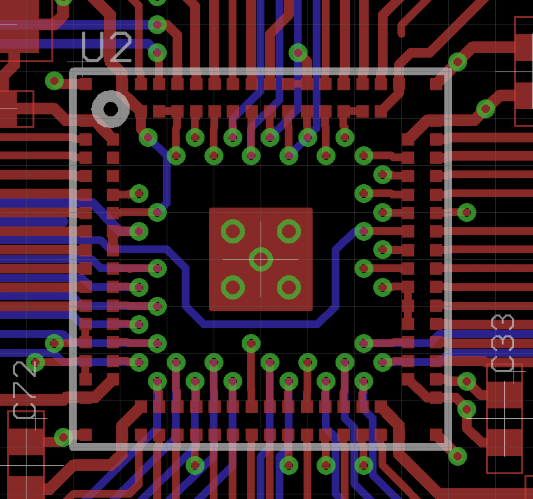
However, thermal-via design is different from signal via-in-pad design. The component manufacturer’s recommended via diameter, number of vias, spacing, solder-paste pattern, and plugging/tenting requirements should be followed.
Microvia Design for HDI PCBs
Microvias are one of the key technologies used in High-Density Interconnect (HDI) PCBs, allowing designers to create very compact layer-to-layer connections where conventional mechanically drilled vias would consume too much routing space. They are particularly useful for fine-pitch BGA packages, compact consumer electronics, smartphones, wearables, IoT devices, and high-density embedded systems.
Unlike conventional through-hole vias, microvias are typically formed using laser drilling through a thin dielectric layer. Their shallow structure allows them to connect adjacent layers while occupying considerably less PCB area. This makes it possible to route more signals in a smaller board area and simplify escape routing from fine-pitch packages.
Staggered Microvias
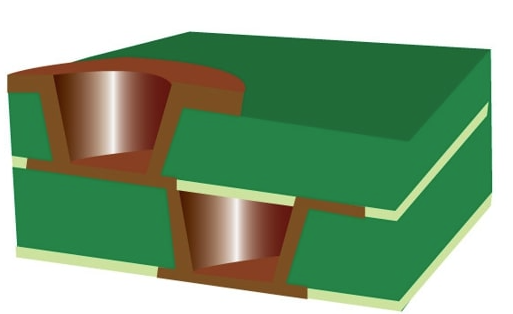
In a staggered microvia structure, microvias on successive layers are offset rather than positioned directly above one another. The main advantage is improved manufacturability and reliability compared with more demanding stacked structures.
Stacked Microvias
Stacked microvias are positioned vertically above one another and share a common connection between successive layers. They provide excellent routing density because multiple layer transitions can occupy essentially the same X-Y location.
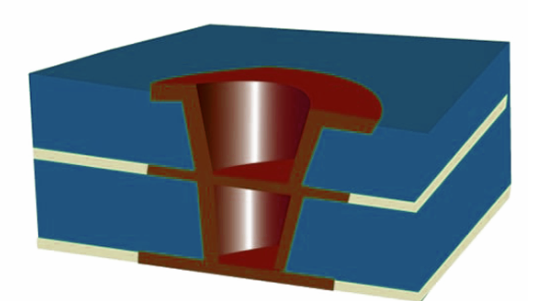
The major advantage is maximum routing density, making stacked structures particularly useful for extremely fine-pitch packages. However, they are more demanding to manufacture and introduce additional reliability considerations.
Microvias for BGA Fanout
One of the most important applications of microvias is fine-pitch BGA fanout. With a conventional mechanically drilled via, the via pad may be too large to fit between adjacent BGA pads. A microvia can instead provide a compact connection from the BGA pad to the next PCB layer. This is especially valuable as BGA pitch decreases. The designer can route signals from the outer BGA pads into the first HDI layer and continue routing through subsequent layers without requiring a large conventional via structure.
Stacked vs Staggered Microvias
PCB Via Design for Power and Ground
Vias play an important role in PCB power distribution and grounding, particularly when a design uses multiple copper layers. A single via may be sufficient for a low-current signal, but power and ground connections often require multiple vias in parallel to reduce resistance, inductance, voltage drop, and temperature rise.
Power Via Design
When a power trace changes layers, the current must pass through the vias connecting those layers. Using only one small via can create a bottleneck in an otherwise wide, low-resistance power path.
For example, if a power rail carries 3 A and the selected via can safely carry only 1 A under the required thermal conditions, a single via is clearly inadequate. Multiple vias should be placed in parallel so that the current is distributed across several conductive paths.

Ground Via Design
Ground vias are used to connect ground copper pours and planes across multiple PCB layers. This is commonly called ground via stitching.
A dense ground-via structure can provide multiple low-impedance connections between ground regions and can help maintain a short return-current path. It is especially useful around high-speed interfaces, switching regulators, connectors, and RF circuits. Autodesk describes ground stitching as a method for maintaining short return paths and reducing impedance, while also supporting thermal dissipation.
Ground Stitching Around PCB Areas
Ground stitching can also be used to connect large ground pours on the top and bottom layers to an internal ground plane. However, do not fill every available PCB area with ground vias without considering the routing and electrical requirements. Excessive vias can consume routing space and may interfere with traces, differential pairs, component placement, or manufacturing clearances.
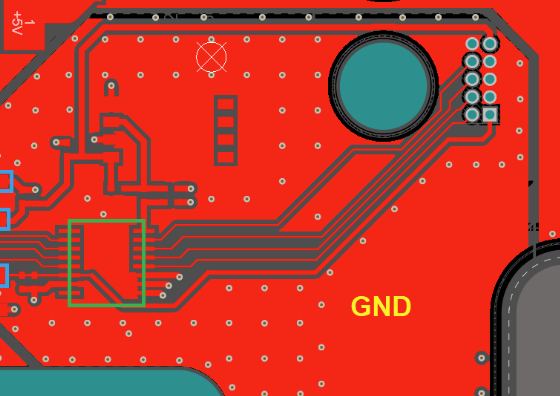
Ground stitching vias are mostly useful for Switching power supplies, Microcontroller boards, RF circuits, USB interfaces, USB interfaces , and USB interfaces.
Conclusion
In conclusion, PCB vias may be small physical structures, but they have a significant influence on routing density, electrical performance, thermal management, signal integrity, and manufacturing reliability. Selecting the right via is therefore much more than choosing a drill diameter and pad size. The designer must consider the PCB thickness, aspect ratio, annular ring, clearance, current requirements, layer transitions, and fabrication capabilities as part of the complete via design. The best PCB via design is a balance between electrical performance, mechanical reliability, routing density, thermal requirements, manufacturing capability, and cost.
Frequently Asked Questions (FAQ)
A via is a plated hole that provides an electrical connection between different copper layers of a PCB.
Via size is determined from several parameters, including the required drill diameter, copper annular ring, PCB thickness, aspect ratio, current requirement, and manufacturing capability.
Via-in-pad is a PCB technique in which a via is placed directly inside a component’s solder pad. It is commonly used with fine-pitch BGAs, CSPs, QFNs, and other high-density packages to reduce routing distance and improve escape routing.
Yes, but high-speed vias require careful design. A via can introduce parasitic capacitance, inductance, impedance discontinuity, and signal reflections.
The required number depends on the current, via construction, copper thickness, allowable temperature rise, PCB thickness, and manufacturer data.
Staggered microvias on adjacent layers are offset from one another, while stacked microvias are vertically aligned. Staggered structures are generally simpler to manufacture, whereas stacked structures provide greater routing density but require more demanding fabrication processes.
Yes. A plated via carries current vertically between copper layers. Its current capability depends on its hole diameter, copper plating thickness, barrel length, temperature rise, and surrounding copper.
Via aspect ratio is commonly calculated using PCB thickness divided by the finished hole diameter. For example:
PCB thickness = 1.6 mm
Finished hole = 0.20 mm
Aspect Ratio = 1.6 / 0.20
= 8:1