Table of Contents

PCB Silkscreen Design: A Complete Guide to Layout, Text and Best Practices

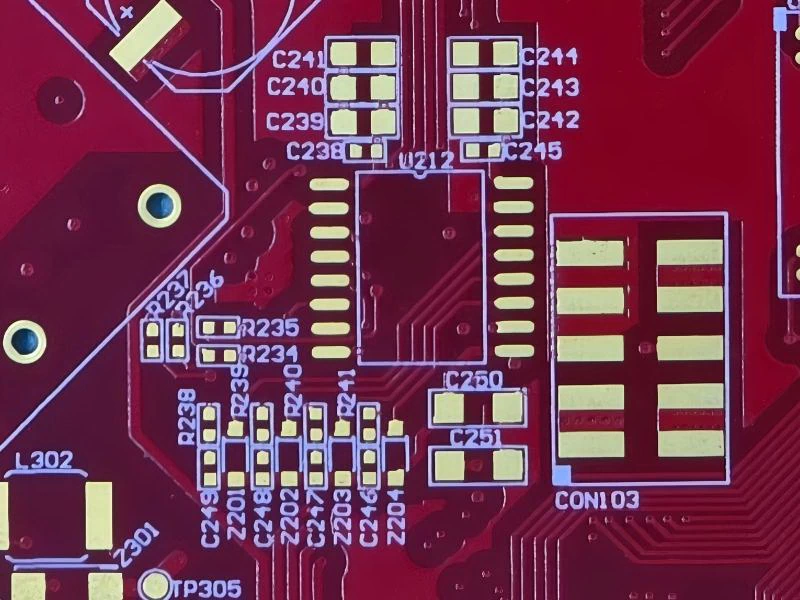
Close-up of a printed circuit board showing clear white silkscreen markings for component reference designators, polarity, and pin 1.

The silkscreen layer is a critical yet often overlooked aspect of PCB design, serving as a visual guide for component placement, orientation, and identification. This comprehensive guide delves into the essential guidelines for effective PCB silkscreen design, covering layout principles, text sizing, IPC standards, and manufacturing best practices. Whether you’re a beginner or an experienced designer, these insights will help you avoid assembly errors, improve board functionality, and ensure seamless communication between design and manufacturing teams. Optimize your silkscreen for clarity, durability, and professionalism.

What is the PCB Silkscreen?

The PCB silkscreen is the layer of text, symbols, and logos printed on a circuit board’s surface. Typically white, this non-conductive ink layer acts as an instructional guide for PCB assembly and debugging. It clearly labels components with their reference designators (like R1, C2, U5), shows polarity marks, pin-1 indicators, and other critical identifiers. While not electrically functional, a well-designed PCB silkscreen is crucial for preventing errors during PCB assembly process and for simplifying testing and repair, making it an essential part of the PCB manufacturing and design for manufacturability (DFM) process.

Reviewing the PCB silkscreen layer in a Gerber file viewer for errors and clarity.
Silkscreen review in Gerber document
Close-up of a completed assembled PCB showing clear white silkscreen identification markings for components, polarity, and pin 1.
Finished silkscreen review on PCB surface

PCB Silkscreen Colors: Options and Selection Guidelines

White is the standard and most common PCB silkscreen color, prized for its excellent contrast on green solder masks and its manufacturability.

 However, other PCB silkscreen colors like yellow, black, and red are also widely available and chosen for aesthetic or specific design reasons. While unique colors such as pink may be requested, they are often not recommended for most designs. Pink can pose manufacturability challenges, including legibility issues and higher production costs, making it less practical for functional applications.

Comparison of common PCB silkscreen colors (white, yellow, black) on green, blue, and red solder mask layers

How is PCB Silkscreen Applied?

In PCB manufacturing process, the silkscreen is typically applied using one of two primary methods. The first is Liquid Photo Imaging (LPI), which offers high precision and sharpness. The second, and our focus here, is direct legend printing. This method utilizes an automated ink-jet printer to directly apply the epoxy ink onto the PCB surface. While highly efficient, the ink-jet process can sometimes result in a slightly blurry silkscreen appearance, particularly around the edges of characters, due to the nature of the ink deposition.

Close-up of the traditional screen printing process for PCB silkscreen, showing a squeegee pressing ink through a mesh stencil onto the PCB surface.
Traditional ink printing silkscreen
Advanced LDI (Laser Direct Imaging) equipment precisely ablating the solder mask to create high-resolution PCB silkscreen markings.
Advanced laser printing silkscreen

Key Principles for Effective PCB Silkscreen Design

To ensure legibility in PCB silkscreen design, adhering to specific dimensional guidelines is critical. A fundamental rule is maintaining an optimal aspect ratio for silkscreen text, such as 1:6 (width to height). This proportion guarantees that characters remain sharp and readable after the manufacturing process.

Infographic summarizing key PCB silkscreen design rules: text size, clearance from pads, orientation, and polarity marking standards.

Furthermore, it’s essential to account for manufacturing tolerances. The achievable minimum silkscreen line width is directly influenced by the PCB’s base copper thickness. Thicker copper layers can necessitate slightly wider silkscreen lines to maintain clarity. The following table provides detailed specifications based on copper weight.

PCB Silkscreen Guidelines: Ensuring Legibility and Avoiding Assembly Errors

1. Minimum Silkscreen Line Width
A minimum line width of 4 mils is essential for reliable silkscreen reproduction. Features narrower than this threshold cannot be consistently printed by standard PCB manufacturing processes, resulting in incomplete or missing legends that compromise board legibility and functionality.


2. Critical Clearance from Board Features
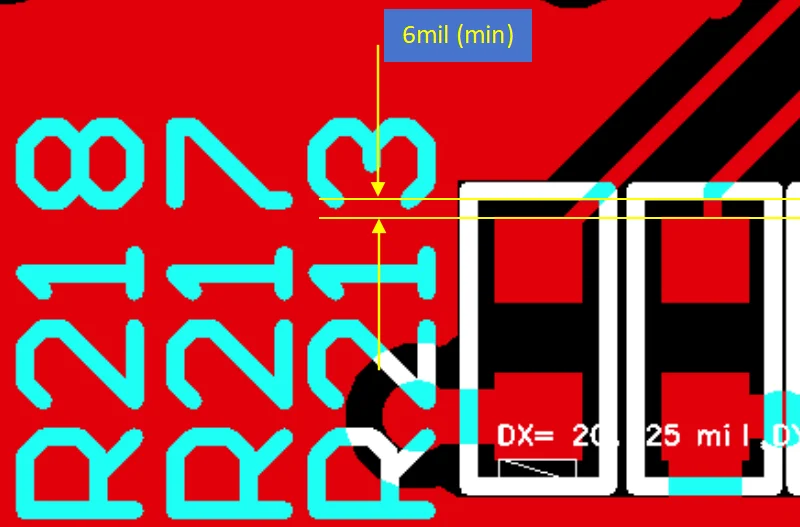
Maintain a minimum 6-mil clearance between the silkscreen and all conductive or exposed features, including solder mask openings (pads), component holes, test points, and fiducial marks. This prevents the silkscreen ink from encroaching onto SMT pads, where it would act as an unintended insulating layer and severely inhibit proper solder joint formation during assembly.

PCB design guidelines showing proper silkscreen clearance from solder mask opening pads with minimum spacing requirements and anti-encroachment examples.
Base Copper (oz)Minimum Silkscreen width (mil)Silkscreen Height (mil)
0.5424
1530
2636

3. Maintain Non-Overlapping Silkscreen

Ensure all silkscreen elements remain distinct and separate. Overlapping text or symbols creates visual clutter that causes assembly errors and complicates debugging. This fundamental practice prevents ink smearing during manufacturing while supporting efficient PCB assembly and reliable circuit operation.

Example of poor PCB silkscreen design showing text overlapping solder pads, component outlines, and via holes, causing readability issues and potential assembly errors.
Example of proper PCB silkscreen design with optimal component spacing, clear text legibility, and no overlapping on solder pads or vias following IPC standards.

4. Maintain a Logical Reading Direction
Arrange all silkscreen designations in a consistent, sequential flow—either strictly from left to right or from top to bottom. This standardized approach dramatically speeds up visual inspection and debugging.

5. Ensure Accurate Component-Designation Pairing
Every silkscreen label (e.g., R5, C10, U1) must be placed unambiguously next to its corresponding component. Incorrect pairing is a primary source of confusion during PCB assembly and can lead to costly rework.

6. Clearly Mark Polarity and Orientation
For diodes, electrolytic capacitors, ICs, and other polarized components, the polarity mark or Pin 1 indicator must be explicitly and correctly printed. This is non-negotiable for preventing catastrophic assembly errors.

7. Utilize Mechanical Layers for Reference Graphics
Non-essential graphics, logos, or reference marks that are not critical for assembly should be placed on a mechanical (GM) layer. This keeps the primary silkscreen layer clean and focused on functionality.

8. Substitute with Assembly Drawings in Dense Layouts
On high-density boards where space for silkscreen is severely limited, the standard silkscreen layer can be omitted. In such cases, a detailed assembly drawing on a separate layer must be provided to convey all critical component and orientation information.

Example of a PCB design with intentionally omitted silkscreen layer in Gerber files, showing clean solder mask surface without component markings.
High density PCB with non-silkscreen in Gerber file
Example of a high-density PCB layout using assembly drawings as a substitute for silkscreen, showing detailed component placement and orientation markings.
High density PCB with a separate silksreen layer in PDF
High-density finished PCB board without silkscreen layer, showing clean surface with micro components and precise solder joints under macro photography.
No silkscreen layer in a finished high density PCB board

9. Mirror the Bottom Layer in Gerber Files
The silkscreen for the bottom side of the PCB must be viewed and output in the Gerber files as a mirror image. This ensures it aligns correctly with the bottom-side components when viewed from the top of the board during the manufacturing and assembly process.

Gerber file viewer screenshot showing correct mirroring of bottom layer PCB silkscreen for manufacturing, with text and components properly oriented.
Correct (mirrored) bottom silkscreen design in Gerber
Example of incorrect PCB Gerber file design showing non-mirrored bottom silkscreen layer causing reversed text and orientation errors on assembled board.
Wrong (non-mirrored) bottom silkscreen design in Gerber

6 Essential PCB Silkscreen Design Rules for Error-Free Assembly

  1. Standardize Component Orientation: Position all similar components in the same direction on the silkscreen. This standardization drastically speeds up PCB assembly, testing, and inspection by reducing operator confusion.
Diagram illustrating PCB silkscreen orientation guidelines showing proper component marking direction and alignment for automated assembly.

2. Standardize Component Orientation: Position all similar components in the same direction on the silkscreen. This standardization drastically speeds up PCB assembly, testing, and inspection by reducing operator confusion.

Example of incorrect PCB silkscreen placement over plated through-holes, showing blurred text and ink bleeding into holes causing readability issues.

3. Keep Silkscreen Clear of RF Traces: Silkscreen ink can slightly alter the impedance of sensitive RF (Radio Frequency) circuits. Maintain a clear distance to ensure signal integrity.

Example of incorrect PCB silkscreen placement over RF transmission lines, showing how ink can cause impedance discontinuities and signal integrity issues in high-frequency circuits.
Example of proper PCB silkscreen placement near RF transmission lines with safe clearance, showing clear markings while maintaining signal integrity in high-frequency circuits.

4. Match Component Polarity Markings: Always replicate the polarity and pin-1 indicators exactly as specified in the component’s datasheet. This is non-negotiable for preventing catastrophic assembly errors with ICs, diodes, and LEDs.

5. Label Multi-Pin Components: For components like connectors and ICs, clearly mark pin 1 and subsequent pin numbers on the silkscreen. This aids immensely in debugging and rework.

Comparison diagram showing schematic symbol polarity marking versus PCB silkscreen implementation for capacitor EEE-FT1H331AP, highlighting positive and negative terminal alignment.
Close-up of aluminum electrolytic capacitor EEE-FT1H331AP showing polarity marking with negative stripe and "+" symbol on PCB silkscreen.

6. Accurately Outline Special Packages: For components like BGA and QFN, the silkscreen outline must match the component’s physical size and pad placement precisely. This provides a visual guide for accurate placement.

PCB silkscreen design showing precise outline marking for integrated circuits (ICs) with pin 1 indicator, orientation notch, and component boundary alignment.

Ready to Perfect Your PCB Silkscreen?

Mastering silkscreen design is a hallmark of professional and reliable PCB layout. If you’re looking for a manufacturing partner with expertise in optimizing every detail for performance and yield, Weller PCB is here to help. Our team specializes in Design for Manufacturability (DFM) and will ensure your silkscreen—and your entire board—is executed flawlessly.

Contact us today at [email protected] for a consultation and quote.

Recent Posts

Get In Touch With Us Today

Drag & Drop Files Here (dsn, pdf, xlsx, dxf, zip, rar up to 8M)
or
This form is protected by Google’s Terms of Service and Privacy Policy.

Related Posts

How to draw and design a PCB schematic step by step, professional PCB circuit schematic design tutorial for electronics engineers and hardware designers

Introduction Introduction Modern electronic devices are seamlessly integrated into our daily lives. Technology.

Leave a Reply

Your email address will not be published. Required fields are marked *