What is a PCB Fabrication Drawing
A PCB fabrication drawing—also known as a fabrication print, PCB manufacturing drawing, or fab notes—is a detailed engineering document that provides critical non-electrical manufacturing instructions for producing a printed circuit board (PCB). While Gerber files define the electrical layout (copper layers, soldermask, silkscreen, etc.), the fabrication drawing focuses on the physical and process-related specifications needed to ensure the PCB is built correctly and reliably.

A PCB fabrication drawing is an essential bridge between PCB design and manufacturing. One of the most important functions of the PCB fabrication drawing is quality control and design verification. It allows the manufacturer to cross-check the provided CAD data with the intended specifications, identifying any discrepancies in hole sizes, material types, tolerances, or special features before production begins. It also aids in the final inspection process, ensuring the completed PCB meets all outlined requirements.
Why Do You Deed a PCB Fabrication Drawing
The purpose of a PCB fabrication drawing is to clearly define what the final, manufactured circuit board will look like and how it should be built.
Is there a one-size-fits-all specification for PCB fabrication? The answer is no — every PCB has unique manufacturing and quality requirements, which must be specified by the end-user or PCB designer, based on the product’s application, performance needs, and industry standards.
The PCB fabrication drawing serves as a critical reference document for the PCB fabrication house. It is used to verify that the design intent is accurately translated into physical production, helping to identify any discrepancies between CAD data and fabrication specifications — such as the number and type of holes (plated vs. non-plated), material types, board dimensions, tolerances, silkscreen and soldermask details, and special features (e.g., gold fingers, cutouts, or mounting holes).
In addition, the fabrication drawing plays a key role in the final quality inspection process, enabling inspectors to confirm that the manufactured PCBs meet all the defined specifications and quality criteria outlined on the drawing. Generally, it should include some critical information as below:
The Basic Information that PCB Fabrication Drawing Should Have
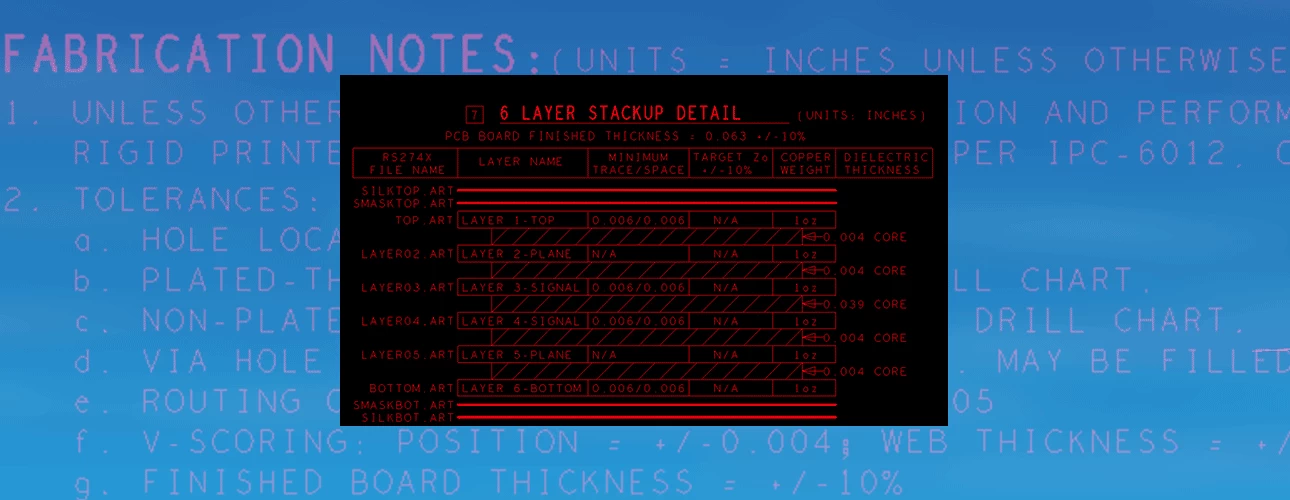
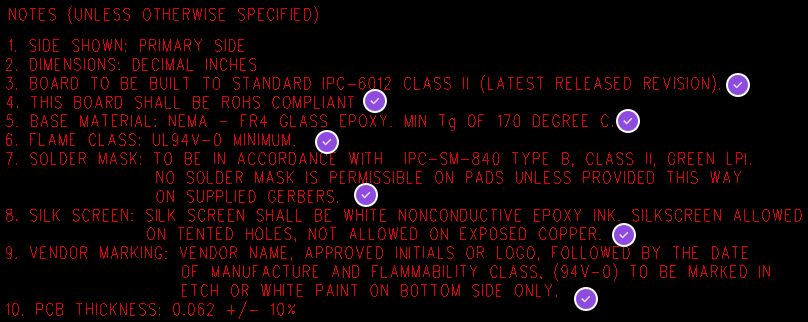
Fabrication Notes
The fabrication notes generally listed by several items, which referred as a tooling for circuit board design engineers to specify the cosmetics, physicals, and function of the final PCB. Additionally, the fabrication notes are communication between the PCB designer and circuit board fabricate house. PCB factory can interpret the notes into manufacturing instructions to control the quality of the PCB. And, a complete PCB fabrication drawing should also provide accurate specifications for the finished circuit board.
In order to achieve the optimal electronic and mechanical performance of the manufactured circuit board, a circuit board design engineer should be very familiar with the related IPC specifications. IPC-6012, the qualification and performance specification for rigid printed boards; which provides PCB design engineers multiple options to specify on the finished PCB

Specify Quality Criteria
When specifying quality criteria for PCB manufacturing, one of the most critical aspects is selecting the right base materials, such as laminates and prepregs.
For example, the PCB designer should explicitly define the glass transition temperature (Tg) of these materials, which determines how well the PCB can withstand thermal shock and repeated heat cycles during assembly (such as reflow or wave soldering). This requirement is clearly outlined in industry standards like IPC-4101, which specifies the performance requirements for laminate materials.
As an example, IPC-4101/126 defines a high-reliability material that must meet a minimum Tg of 170°C and a minimum thermal decomposition temperature (Td) of 340°C
| IPC-4101 | /99 | /101 | /121 | /124 | /126 | /127 | /127 | /129 | /130 |
| Tg (min) C | 150 | 110 | 110 | 150 | 170 | 110 | 150 | 170 | 170 |
| Td (min) C | 325 | 310 | 310 | 325 | 340 | 310 | 325 | 340 | 340 |
| CTE Z 50-260 C | 3.5% | 4.0% | 4.0% | 3.5% | 3.0% | 40.% | 3.5% | 3.5% | 3.0% |
| T260 (min) minutes | 30 | 30 | 30 | 30 | 30 | 30 | 30 | 30 | 30 |
| T288 (min) minutes | 5 | 5 | 5 | 5 | 15 | 5 | 5 | 15 | 15 |
| Fillers > 5% | Yes | Yes | NA | NA | Yes | Yes | Yes | NA | Yes |
| Dk/Permittivity (max) | 5.4 | 5.4 | 5.4 | 5.4 | 5.4 | 5.4 | 5.4 | 5.4 | 5.4 |
For specialized industries — such as military, aerospace, automotive, or medical electronics — designers must have in-depth knowledge of material selection criteria, as these applications demand higher thermal stability, durability, and reliability under extreme conditions.
Another key method to control both PCB quality and manufacturing cost is to specify the appropriate IPC quality standard, such as those defined in IPC-6012, which governs the acceptability of printed boards.
For instance:
- IPC-6012 Class 3 is required for high-reliability applications (e.g., mission-critical systems), and enforces stricter requirements for copper plating thickness, hole integrity, and surface finish.
- Class 2 is a general-purpose standard, widely used in commercial and industrial electronics, with moderate reliability and inspection requirements.
- Class 1 is the most basic level, intended for non-critical applications, and has the lowest cost but also the least stringent quality controls.
While IPC Class 3 increases manufacturing costs due to tighter specifications and additional inspections, Classes 1 and 2 offer lower costs with reduced requirements.
However, even within Class 2, certain Class 3 criteria may still apply — such as minimum hole copper plating thickness — depending on the end-use application or customer requirements.
Drill Table
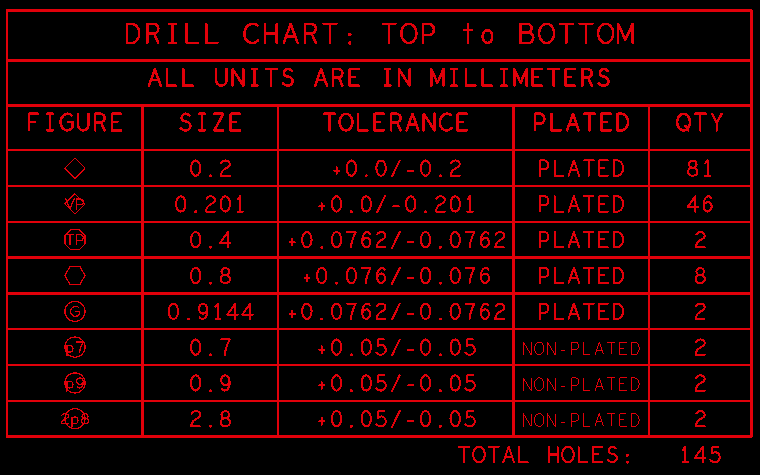
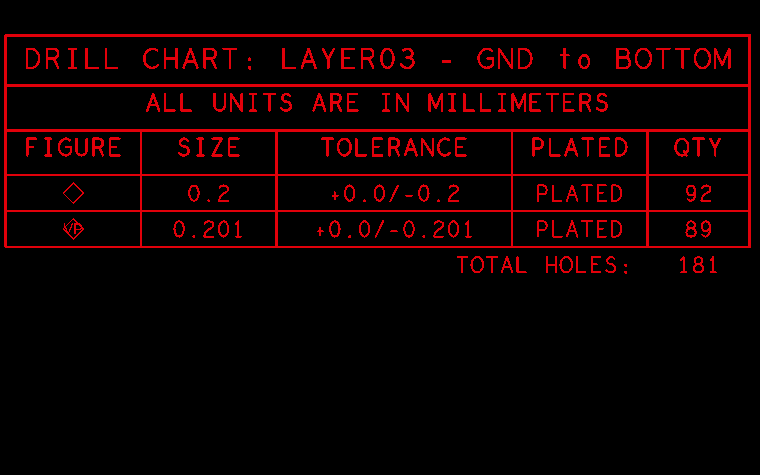
The drill table related the holes and slots drilled (or routed) on the PCB, which is another critical element of the fabrication drawing used for design verification.
It defines all the holes to be drilled into the PCB, including the sizes, quantities, tolerances, plated or non-plated, and symbols that match the drill drawing artwork. Each symbol indicate the placement of each hole on the circuit board. PCB design engineers can also add extra information, such as for blind and buried vias for HDI circuit board, specific tolerances for press-fit holes, etc. to minimize questions from the CAD engineers of PCB factory.
Sometimes CAD systems are not 100% correct and generate mistakes that are out of our control or unknown to us, the double work on fabrication drawing provides additional assurance.
Scaled Drawing
The mechanical drawing is also an important part of fabrication drawing. This drawing should provide some critical dimensions including the accurate outline of the PCB
Also some extra information can be specified on the mechanical drawing, for example, edge plating zones, the details of countersink and counterbore hole, back drilled holes, the zones of copper coins, etc.
In addition to the mechanical dimensions, a good mechanical drawing will include an origin point for the PCB manufacturer to use it as global dimensions verification.
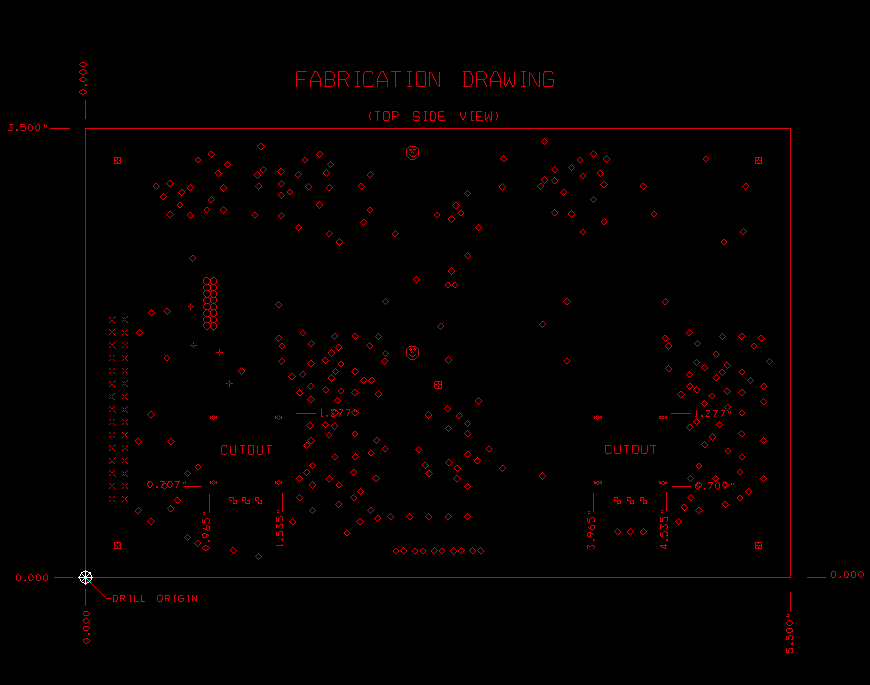

A professional PCB manufacturer will always firstly check the related dimensions on mechanical drawing. Usually, designer’s CAD system was incorrectly configured for Gerber data output, sometimes the physical layers scaled differently than the drill files. Therefore the PCB dimensions can help to figure out the issue quickly, this is very useful.
However, adding too many dimensions on the drawing can make it unreadable and complexity the work. It probably take extra confusion to factory engineers when too many dimensions and angles included on the drawing. Therefore it’s best to include only overall and some critical dimensions.
Stack-up Drawing
A PCB stack-up drawing sequentially shows the circuit layer construction of a multi-layer PCB. This is not always needed in every PCB manufacturing document package, some special designs require specific information. For a single or two-layer PCB, PCB designer only need to specify the copper thickness, the finished board thickness and tolerance in the fabrication notes. However, some PCB designs will need a stack-up drawing with more detailed specifications.

Some senior PCB designers regularly specify the layer arrangement in the PCB packages, but some other designers always fail to be this simple work.
PCB designers can specify finished copper thicknesses for each circuit layer, core thickness and dielectric thickness between layers. These are great information as long as they are presented accurately. However, some stack-ups present these thickness mismatched final PCB thickness, then this will raise up a question flag from PCB manufacturer as engineering questions asking for confirmation. This resulting in placing the board production on hold in engineering, and lead to add more lead time even extra cost to the PCB.
Specify Material Type in the Stack-up Drawing
A PCB design with bind, buried or back drilled holes may have multiple drill sequences. A drawing presenting all the drill sequences will have the supplier thoroughly know the number of laminate pressing and drill cycles before final inspection, avoiding the guesswork. Although a professional PCB CAM engineer can identify each drill segment from the PCB artwork, an educated guess is still a guess and consuming much time.
A complete stack-up should also present the base material type and the dielectric thickness between layers. Usually this information is necessary for the circuit board with controlled impedance requirements. The specific material type and dielectric thickness can help control impedance track, and with careful manufacturing’s optimizing and compensation, PCB production engineers can mostly minimize Electromagnetic Interference (EMI) and crosstalk through strategic reference plane placement.

The stack-up drawing is a great way to specify controlled impedance requirements and details. The best impedance trace details are placed in a specific table, identifying the impedance traces on each layer. Also the table should include impedance track width, space for structures, target impedance value for each (pair) traces, and the layers each trace will reference.
Some special application PCBs have thermal management specifications like copper coin technology or Insulated Metal Substrate (IMS). Copper coins and metal substrates come in multiple shapes and sizes. The stack-up drawing is a good option to show PCB manufacturer about the thickness and shape of the coins and the details of the IMS technology, for example, the thickness of thermal dielectric and metal substrates.
Controlled Impedance
A controlled impedance PCB usually requires a specified layer stack-up, consistent dielectric thickness, and often impedance test coupons (also called impedance coupons) placed on the PCB panel for post-production verification. These coupons help validate that the actual impedance matches the design intent — a key step in PCB quality control and manufacturing validation.
To achieve controlled impedance, PCB designers must work closely with manufacturers by providing detailed stack-up information, trace widths, spacing, dielectric material properties (Dk, Df), and copper weights. Tools like Polar SI9000 or built-in impedance calculators in Altium, Cadence, or KiCad are used to determine the right geometries.
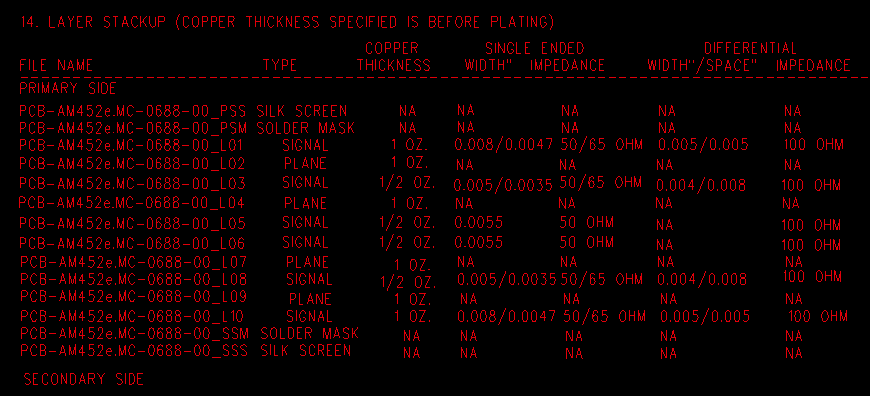
The stack-up drawing is a great way to specify controlled impedance requirements and details. The best impedance trace details are placed in a specific table, identifying the impedance traces on each layer. Also the table should include impedance track width, space for structures, target impedance value for each (pair) traces, and the layers each trace will reference.
Some special application PCBs have thermal management specifications like copper coin technology or Insulated Metal Substrate (IMS). Copper coins and metal substrates come in multiple shapes and sizes. The stack-up drawing is a good option to show PCB manufacturer about the thickness and shape of the coins and the details of the IMS technology, for example, the thickness of thermal dielectric and metal substrates.
PCB Panel Array Drawing
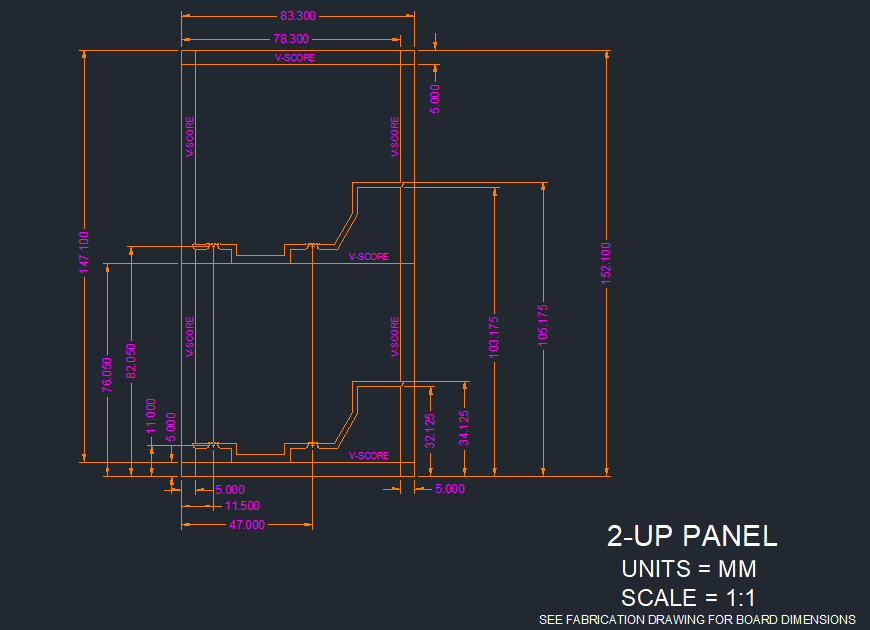
A array drawing is a scaled drawing presenting the number of PCBs in each array. It should remark dimension measurements and have accurate spacing between each circuit board. At most cases the rails is necessary to array for convenience of PCB assembly. The rails of an array should have at least three fiducials and four tooling holes placed on. Fiducials are used by SMT machines to maintain accuracy through PCB assembly, the tooling holes is used for tightly hold the boards during some PCB production process such as electrical testing, outline or profile routing. When the circuit board design has uneven distribution of circuit traces and copper planes, then the dummy PAD (or thieving) is needed to ensure more uniform plating across the panel, while the rails are a good place to add it without affecting the circuit board.
Reversions updating is a common work in electronics design field. An updated fabrication drawing can save engineering time of design for manufacturing. Most PCB factory’s engineers and buyers do not like much time spent in front-end engineering. A good updated fab drawing will speed up the engineering review and have the PCB manufactured at a better lead time. Additionally, try to make your update as simple and thorough as possible. The redundant information. Too much redundant information could increases the risk of missing something during revision, and leading to additional questions and longer lead times.
A complete PCB fabrication drawing will take a great feeling to PCB manufacturing house. The drawing should be very clear and concise with containing all necessary information. If the details or notes are scattered, it’s better to revise it as simple and clear, no confusion. PCB production is a type of custom manufacturing service. The experienced manufacturer well know how to manufacture the board at high quality and high reliability, but they may not have the experience in manufacturing particular design. This may require some extra questions and communications, the purpose of the PCB fabrication drawing is to minimize thoroughly eliminate these questions. More or less optimizing this part of the design is a time-consuming work, but absolutely it is worth to do it for a better quality, cost, and lead times.